 MirrorGo
How to cast photos and videos from your iPhone to a Google TV
With MirrorGo you can show the photos and videos from your iPhone's library on a Google TV, in full quality, and swipe through them on the phone while the TV follows.
Step by step
- Connect MirrorGo to a Google TV.
- On MirrorGo's Home, tap Photos & Videos and allow access to your photos.
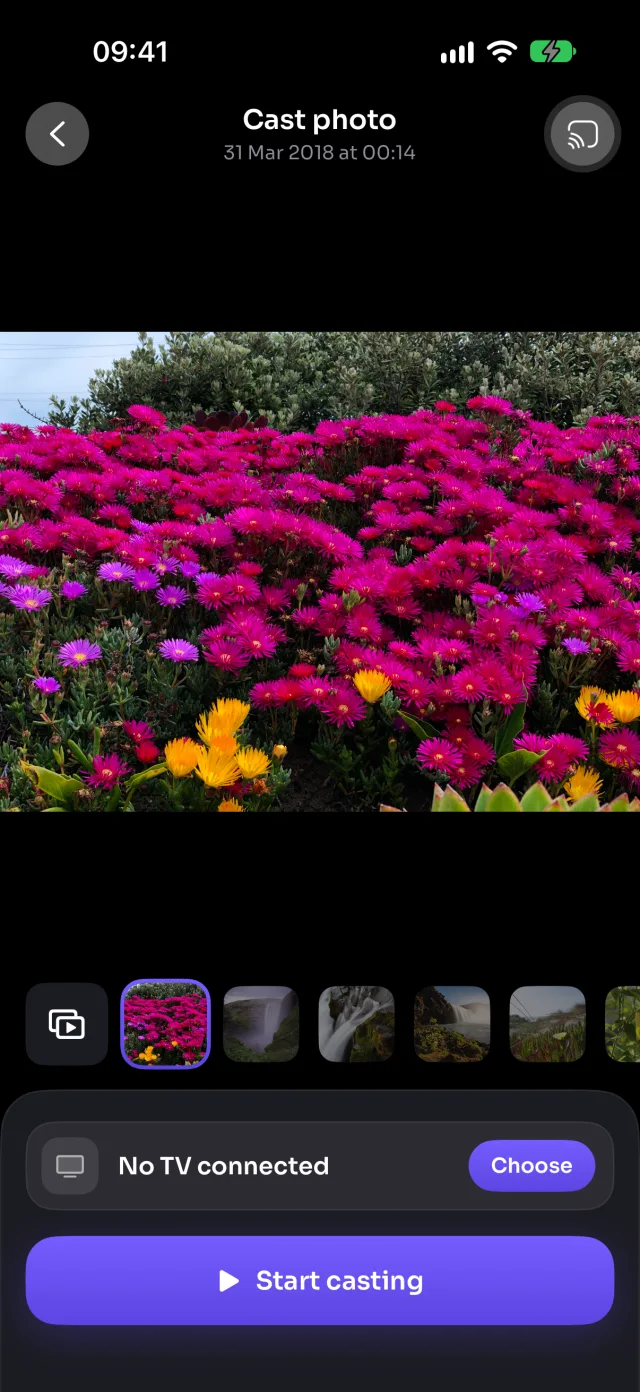
- Pick Videos or Photos at the top, then tap the one you want.
- Tap Start casting. It shows on the TV in a moment.
- Swipe through the strip under the picture: the TV follows. Videos play, pause and seek from the phone.
On Google TV
Photos go to the TV over your Wi-Fi as full-screen pictures; videos play in MirrorGo's player on the TV, with play, pause and seek on the phone.
Good to know
- Auto play (the button at the start of the strip) turns it into a slideshow: 5 to 30 seconds a photo, videos to the end, and Repeat to start over.
- With limited photo access, only the photos you picked show up. To show them all: Settings › MirrorGo › Photos › Full Access.
- Your photos and videos go from your iPhone to the TV over your Wi-Fi. They aren't uploaded anywhere.
- Casting stops when you close the screen.
Coming soon to the App Store
More for Google TV
Screen mirroringMirror your iPhone to Google TVConnectHow to Connect an iPhone to a Google TVWeb imagesHow to Show Free Web Images on a Google TV from an iPhoneLive TV (IPTV)How to Watch Free Live TV Channels (IPTV) on a Google TV with an iPhoneYouTubeHow to Cast YouTube from iPhone to a Google TVWeb videosHow to Cast Videos from Any Website to a Google TV with an iPhoneCameraHow to Show Your iPhone Camera Live on a Google TV
Photos & videos on other TVs
Samsung TVHow to Cast Photos and Videos from iPhone to a Samsung TVLG TVHow to Cast Photos and Videos from iPhone to an LG TVRokuHow to Cast Photos and Videos from iPhone to a RokuAndroid TVHow to Cast Photos and Videos from iPhone to an Android TVChromecastHow to Cast Photos and Videos from iPhone to a ChromecastFire TVHow to Cast Photos and Videos from iPhone to a Fire TVApple TV & AirPlayHow to Cast Photos and Videos from iPhone to an Apple TVAny web browserHow to Cast Photos and Videos from iPhone to a Web Browser