 MirrorGo
How to show beautiful free images on a Google TV
MirrorGo searches millions of free, openly licensed images from Wikimedia Commons (landscapes, space, cities, animals, art) and shows them full screen on a Google TV, one by one or as a slideshow.
Step by step
- Connect MirrorGo to a Google TV.
- On MirrorGo's Home, tap Web Images.
- Search for anything, or tap a topic: Nature, Space, Cities, Animals, Ocean, Mountains, Art, Flowers.
- Tap an image, then tap Start casting.
- Swipe to the next image and the TV follows, or turn on the slideshow.
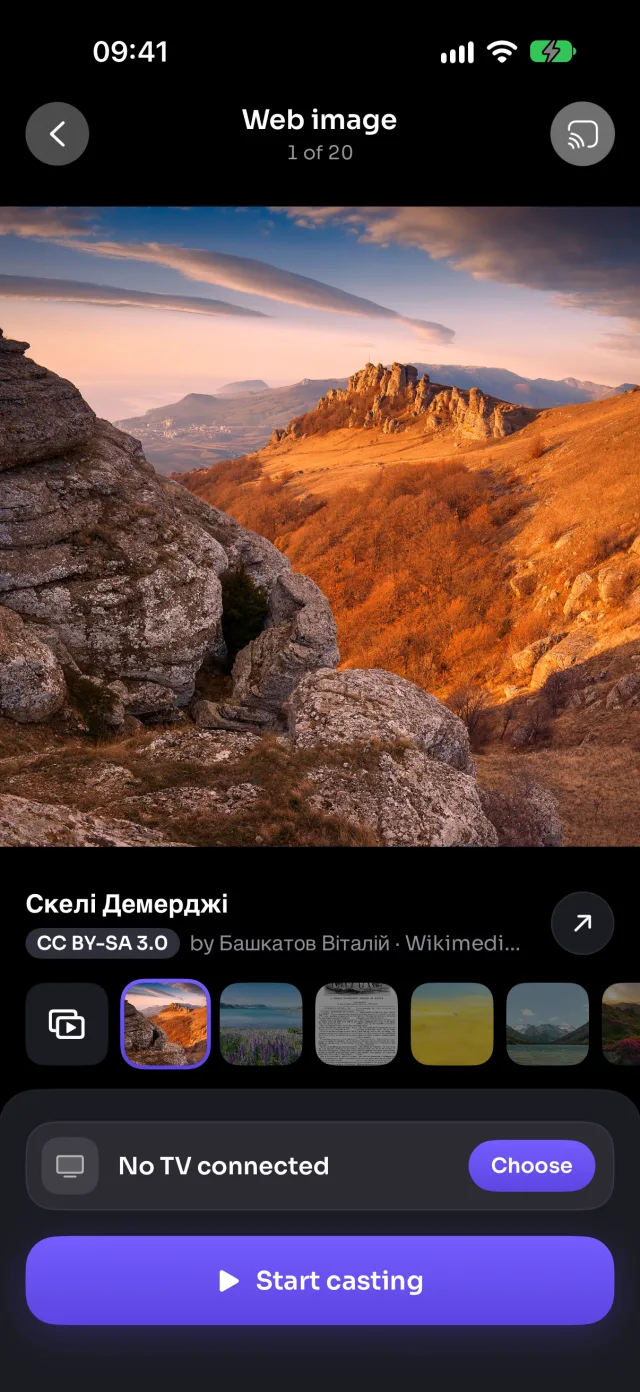
On Google TV
Images show full screen through the TV's built-in Chromecast.
Good to know
- Each image shows its title, author and licence: tap ↗ to open its page on Wikimedia Commons.
- Recent searches are kept on the start screen, so your favourite topics are one tap away.
- Images that may be mature are filtered out.
Coming soon to the App Store
More for Google TV
Screen mirroringMirror your iPhone to Google TVConnectHow to Connect an iPhone to a Google TVPhotos & videosHow to Cast Photos and Videos from iPhone to a Google TVLive TV (IPTV)How to Watch Free Live TV Channels (IPTV) on a Google TV with an iPhoneYouTubeHow to Cast YouTube from iPhone to a Google TVWeb videosHow to Cast Videos from Any Website to a Google TV with an iPhoneCameraHow to Show Your iPhone Camera Live on a Google TV
Web images on other TVs
Samsung TVHow to Show Free Web Images on a Samsung TV from an iPhoneLG TVHow to Show Free Web Images on an LG TV from an iPhoneRokuHow to Show Free Web Images on a Roku from an iPhoneAndroid TVHow to Show Free Web Images on an Android TV from an iPhoneChromecastHow to Show Free Web Images on a Chromecast from an iPhoneFire TVHow to Show Free Web Images on a Fire TV from an iPhoneApple TV & AirPlayHow to Show Free Web Images on an Apple TV from an iPhoneAny web browserHow to Show Free Web Images on a Web Browser from an iPhone