 MirrorGo
How to show beautiful free images on an Android TV
MirrorGo searches millions of free, openly licensed images from Wikimedia Commons (landscapes, space, cities, animals, art) and shows them full screen on an Android TV, one by one or as a slideshow.
Step by step
- Connect MirrorGo to an Android TV.
- On MirrorGo's Home, tap Web Images.
- Search for anything, or tap a topic: Nature, Space, Cities, Animals, Ocean, Mountains, Art, Flowers.
- Tap an image, then tap Start casting.
- Swipe to the next image and the TV follows, or turn on the slideshow.
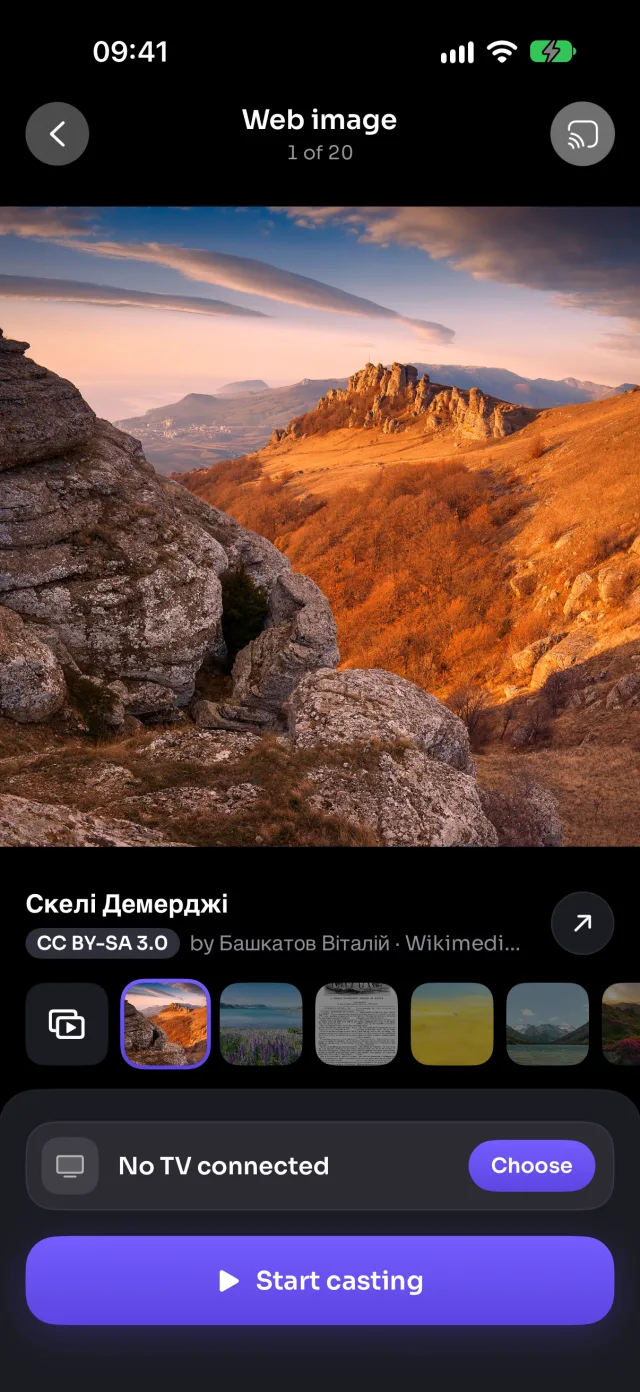
On Android TV
Images show full screen through the TV's built-in Chromecast.
Good to know
- Each image shows its title, author and licence: tap ↗ to open its page on Wikimedia Commons.
- Recent searches are kept on the start screen, so your favourite topics are one tap away.
- Images that may be mature are filtered out.
Coming soon to the App Store
More for Android TV
Screen mirroringMirror your iPhone to an Android TVConnectHow to Connect an iPhone to an Android TVPhotos & videosHow to Cast Photos and Videos from iPhone to an Android TVLive TV (IPTV)How to Watch Free Live TV Channels (IPTV) on an Android TV with an iPhoneYouTubeHow to Cast YouTube from iPhone to an Android TVWeb videosHow to Cast Videos from Any Website to an Android TV with an iPhoneCameraHow to Show Your iPhone Camera Live on an Android TV
Web images on other TVs
Samsung TVHow to Show Free Web Images on a Samsung TV from an iPhoneLG TVHow to Show Free Web Images on an LG TV from an iPhoneRokuHow to Show Free Web Images on a Roku from an iPhoneGoogle TVHow to Show Free Web Images on a Google TV from an iPhoneChromecastHow to Show Free Web Images on a Chromecast from an iPhoneFire TVHow to Show Free Web Images on a Fire TV from an iPhoneApple TV & AirPlayHow to Show Free Web Images on an Apple TV from an iPhoneAny web browserHow to Show Free Web Images on a Web Browser from an iPhone