 MirrorGo
How to cast photos and videos from your iPhone to an Android TV
With MirrorGo you can show the photos and videos from your iPhone's library on an Android TV, in full quality, and swipe through them on the phone while the TV follows.
Step by step
- Connect MirrorGo to an Android TV.
- On MirrorGo's Home, tap Photos & Videos and allow access to your photos.
- Pick Videos or Photos at the top, then tap the one you want.
- Tap Start casting. It shows on the TV in a moment.
- Swipe through the strip under the picture: the TV follows. Videos play, pause and seek from the phone.
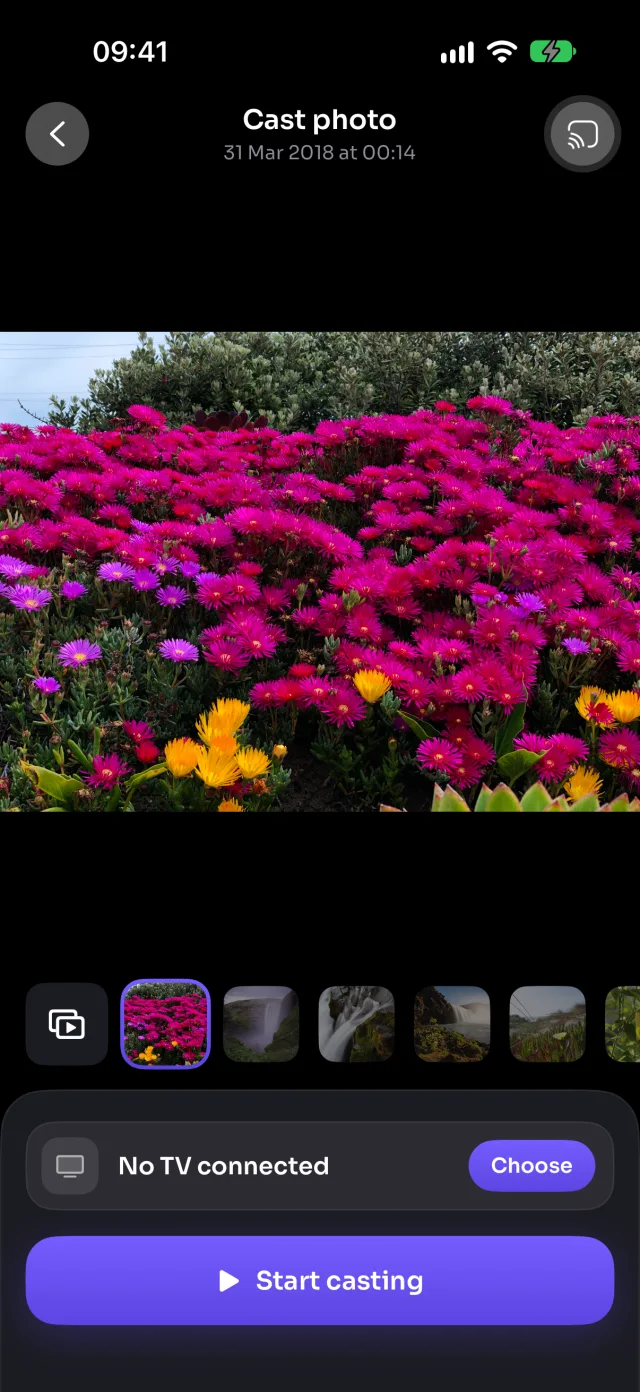
On Android TV
Photos go to the TV over your Wi-Fi as full-screen pictures; videos play in MirrorGo's player on the TV, with play, pause and seek on the phone.
Good to know
- Auto play (the button at the start of the strip) turns it into a slideshow: 5 to 30 seconds a photo, videos to the end, and Repeat to start over.
- With limited photo access, only the photos you picked show up. To show them all: Settings › MirrorGo › Photos › Full Access.
- Your photos and videos go from your iPhone to the TV over your Wi-Fi. They aren't uploaded anywhere.
- Casting stops when you close the screen.
Coming soon to the App Store
More for Android TV
Screen mirroringMirror your iPhone to an Android TVConnectHow to Connect an iPhone to an Android TVWeb imagesHow to Show Free Web Images on an Android TV from an iPhoneLive TV (IPTV)How to Watch Free Live TV Channels (IPTV) on an Android TV with an iPhoneYouTubeHow to Cast YouTube from iPhone to an Android TVWeb videosHow to Cast Videos from Any Website to an Android TV with an iPhoneCameraHow to Show Your iPhone Camera Live on an Android TV
Photos & videos on other TVs
Samsung TVHow to Cast Photos and Videos from iPhone to a Samsung TVLG TVHow to Cast Photos and Videos from iPhone to an LG TVRokuHow to Cast Photos and Videos from iPhone to a RokuGoogle TVHow to Cast Photos and Videos from iPhone to a Google TVChromecastHow to Cast Photos and Videos from iPhone to a ChromecastFire TVHow to Cast Photos and Videos from iPhone to a Fire TVApple TV & AirPlayHow to Cast Photos and Videos from iPhone to an Apple TVAny web browserHow to Cast Photos and Videos from iPhone to a Web Browser