 MirrorGo
How to cast videos from websites to a Roku
Open a website in MirrorGo, play its video, and tap Cast to TV: MirrorGo finds the video (not the ad) and a Roku plays it in full quality while you keep browsing.
Step by step
- Connect MirrorGo to a Roku.
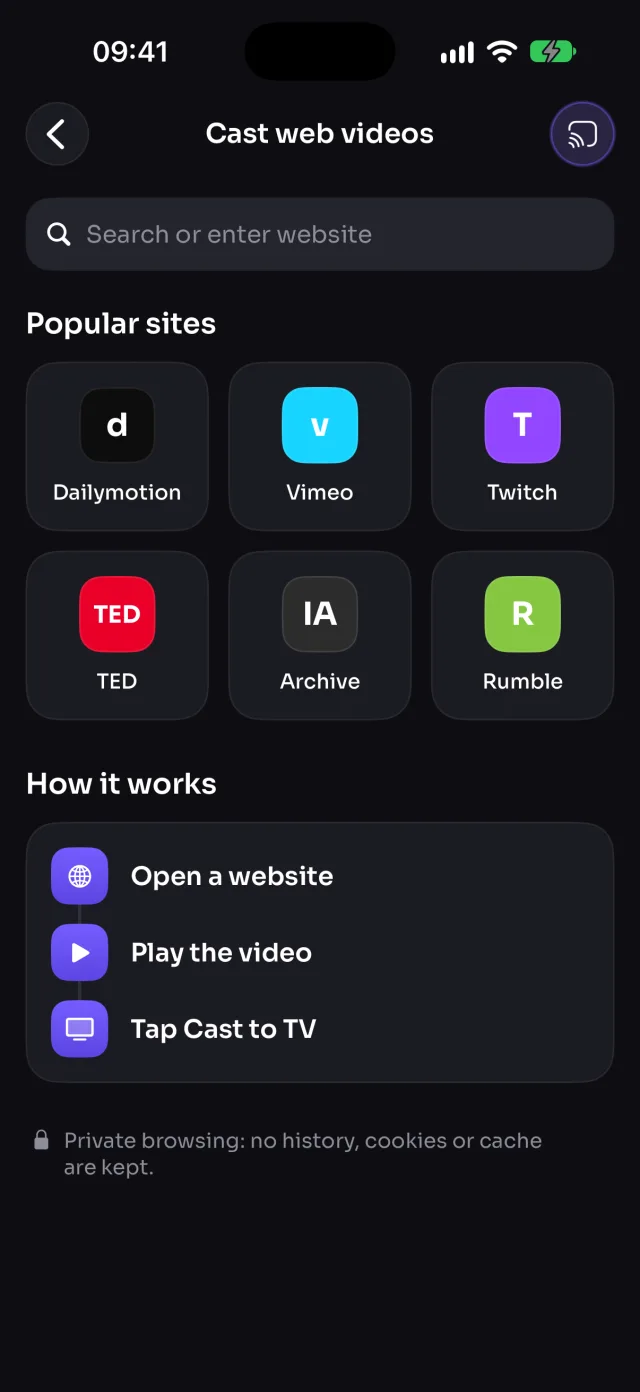
- On MirrorGo's Home, tap Web Videos.
- Open a site from the shortcuts, or type its address.
- Play the video on the page. Cast to TV turns on once MirrorGo finds it.
- Tap Cast to TV. If it found several videos, pick the right one ("1 of 3").
On Roku
The Roku plays the video your iPhone found on the page; keep MirrorGo open while it plays.
Good to know
- MirrorGo blocks ad networks and never casts very short clips, so ads stay off the TV.
- Sites that protect their videos (Netflix, Prime Video, Disney+) can't be cast.
- Keep MirrorGo open while it plays. Browsing is private: no history, cookies or cache are kept.
Coming soon to the App Store
More for Roku
Screen mirroringMirror your iPhone to a RokuConnectHow to Connect an iPhone to a RokuPhotos & videosHow to Cast Photos and Videos from iPhone to a RokuWeb imagesHow to Show Free Web Images on a Roku from an iPhoneLive TV (IPTV)How to Watch Free Live TV Channels (IPTV) on a Roku with an iPhoneYouTubeHow to Cast YouTube from iPhone to a RokuCameraHow to Show Your iPhone Camera Live on a Roku
Web videos on other TVs
Samsung TVHow to Cast Videos from Any Website to a Samsung TV with an iPhoneLG TVHow to Cast Videos from Any Website to an LG TV with an iPhoneGoogle TVHow to Cast Videos from Any Website to a Google TV with an iPhoneAndroid TVHow to Cast Videos from Any Website to an Android TV with an iPhoneChromecastHow to Cast Videos from Any Website to a Chromecast with an iPhoneFire TVHow to Cast Videos from Any Website to a Fire TV with an iPhoneApple TV & AirPlayHow to Cast Videos from Any Website to an Apple TV with an iPhoneAny web browserHow to Cast Videos from Any Website to a Web Browser with an iPhone