 MirrorGo
How to cast videos from websites to a Fire TV
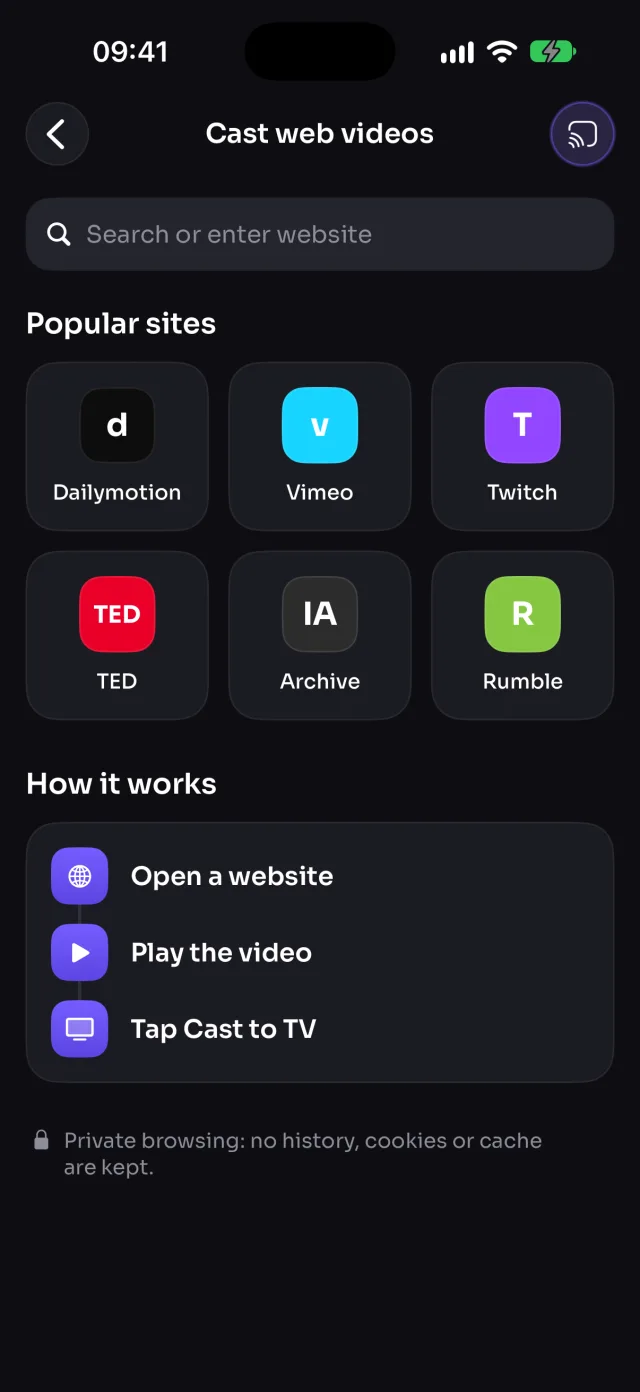
Open a website in MirrorGo, play its video, and tap Cast to TV: MirrorGo finds the video (not the ad) and a Fire TV plays it in full quality while you keep browsing.
Step by step
- Connect MirrorGo to a Fire TV.
- On MirrorGo's Home, tap Web Videos.
- Open a site from the shortcuts, or type its address.
- Play the video on the page. Cast to TV turns on once MirrorGo finds it.
- Tap Cast to TV. If it found several videos, pick the right one ("1 of 3").
On Fire TV
The Fire TV plays the site's video as passed along by your iPhone; keep MirrorGo open while it plays.
Good to know
- MirrorGo blocks ad networks and never casts very short clips, so ads stay off the TV.
- Sites that protect their videos (Netflix, Prime Video, Disney+) can't be cast.
- Keep MirrorGo open while it plays. Browsing is private: no history, cookies or cache are kept.
Coming soon to the App Store
More for Fire TV
Screen mirroringMirror your iPhone to a Fire TVConnectHow to Connect an iPhone to a Fire TVPhotos & videosHow to Cast Photos and Videos from iPhone to a Fire TVWeb imagesHow to Show Free Web Images on a Fire TV from an iPhoneLive TV (IPTV)How to Watch Free Live TV Channels (IPTV) on a Fire TV with an iPhoneCameraHow to Show Your iPhone Camera Live on a Fire TV
Web videos on other TVs
Samsung TVHow to Cast Videos from Any Website to a Samsung TV with an iPhoneLG TVHow to Cast Videos from Any Website to an LG TV with an iPhoneRokuHow to Cast Videos from Any Website to a Roku with an iPhoneGoogle TVHow to Cast Videos from Any Website to a Google TV with an iPhoneAndroid TVHow to Cast Videos from Any Website to an Android TV with an iPhoneChromecastHow to Cast Videos from Any Website to a Chromecast with an iPhoneApple TV & AirPlayHow to Cast Videos from Any Website to an Apple TV with an iPhoneAny web browserHow to Cast Videos from Any Website to a Web Browser with an iPhone